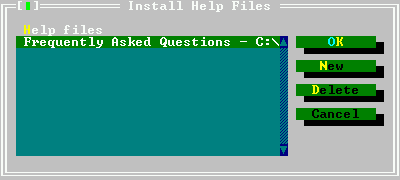
Figure 6.37: The help files dialog
The IDE contains a help system which can display the following file formats:
The help format for the Turbo Pascal help viewer.
The OS/2 help format.
The Norton Guide Help format.
HTML files.
CHM files.
In future some more formats may be added. However, the above formats should cover already a wide spectrum of available help files.
Remark
Concerning the support for HTML files the following should be noted:
The menu item ”Help—Files” permits help files to be added to, and deleted from, the list of files in the help table of contents. The help files dialog is displayed in figure (6.37).
The dialog lists the files that will be presented in the table of contents window of the help system. Each entry has a small descriptive title and a filename next to it. The following actions are available when adding help files:
Adds a new file. IDE will display a prompt, in which the location of the help file should be entered.
If the added file is an HTML file, a dialog box will be displayed which asks for a title. This title will then be included in the contents of help.
Deletes the currently highlighted file from the help system. It is not deleted from the hard disk; only the help system entry is removed.
Discards all changes and closes the dialog.
Saves the changes and closes the dialog.
The Free Pascal documentation can be added to the IDE’s help system. This way the documentation can be viewed from within the IDE. If Free Pascal has been installed using the installer, the installer should have added the FPC documentation to the list of help files, if the documentation was installed as well. The preferred format of FPC documentation for using it in the IDE is CHM (HTML may be used as well, it needs to be indexed when adding it, which takes some time, and it may not work in certain specific cases like 8.3 limited filesystems).
7...but feel free to improve it and send patches to the Free Pascal development team...