General Information
1 - What is Free Pascal (FPC)?
Originally named FPK-Pascal, the Free Pascal compiler is a 16, 32 and 64 bit Turbo Pascal and Delphi compatible Pascal compiler for Linux, Windows, OS/2, FreeBSD, Mac OS X, DOS and several other platforms (the number of supported targets grows all the time, although not all of them are on the same level as the main ones).
The Free Pascal compiler is available for several architectures: x86 (16, 32 and 64 bit), ARM, PowerPC (32 and 64 bit), SPARC (v8, v9), Java Virtual Machine (under development) and MIPS (little and big endian, under development). An older version (the 1.0 series) and current development versions also supported m68k.
The compiler is written in Pascal and is able to compile its own sources. The source files are distributed under the GPLv2+ and included.
Short history
05/2021: 3.2.2 released
06/2020: 3.2.0 released
11/2017: 3.0.4 released
02/2017: 3.0.2 released
11/2015: 3.0.0 released
03/2014: 2.6.4 released
03/2014: 2.6.4 released
02/2013: 2.6.2 released
01/2012: 2.6.0 released
05/2011: 2.4.4 released
11/2010: 2.4.2 released
12/2009: 2.4.0 released
04/2009: 2.2.4 released
08/2008: 2.2.2 released
09/2007: 2.2.0 released
08/2006: 2.0.4 released
12/2005: 2.0.2 released
05/2005: 2.0.0 released
07/2003: 1.0.10 released
04/2002: 1.0.6 released
12/2000: 1.0.4 released
07/2000: 1.0.0 released
03/1996: released on the Internet
03/1995: the compiler compiles its own sources
10/1993: first small programs work
06/1993: project start
2 - What are the advantages of programming in Pascal and Free Pascal?
- Very clean language Pascal is a very nice language, your programs will be more readable and maintainable than for example in C, and let’s even forget about C++. And you don’t need to give up the power, the Pascal language is as powerful as you want it.
- No Makefiles Unlike most programming languages, Pascal does not need Makefiles. You can save huge amounts of time, the compiler just figures out itself which files need to be recompiled.
- Pascal compilers are Fast Yes, you no longer need to grow roots while compiling your programs, just hit the compile key and it’s done, even for large programs.
- Each unit has it’s own identifiers In Pascal you never need to worry about polluting the namespace, like in C where an identifier needs to be unique accross the entire program. No, in Pascal each unit gets it’s own namespace and that’s very relaxed.
- High speed, low memory usage Being a language that is compiled into fast machine code by a modern compiler, Free Pascal has been able to make Pascal one of the fastest languages there are. Further, Free Pascal programs tend to use little memory. For comparison with other languages we suggest the Shootout benchmark and recommend you modify the weights to your own taste.
- Integrated development environment Free Pascal comes with an IDE which work on several platforms, in which you can write, compile and debug your programs. You will save huge amounts of time using the IDE, the best programming friend you have.
- Great integration with assembler Do you think pascal is for wimps who need to learn programming? WRONG! It’s excellent for high tech programming and for the supreme nerds among you we have the integrated assemblers. You can easily mix assembler code and Pascal code, in the language you wish? Prefer Intel styled assembler? No problem, if it’s needed Free Pascal will convert it to ATT for you. Do you want to convert your program into a source file for Nasm? No problem, and all ATT assembler in your source files is automatically converted.
- Object oriented programming And if you do the serious programming, you are of course very interested in object oriented programming. Use the Turbo Pascal and Object Pascal ways of OOP according to your taste. The FCL and Free Vision and provide you with the powerful object libraries you need. For your database needs we support PostgreSQL, MySQL, Interbase and ODBC.
- Smartlinking Free Pascal’s smart linker leaves out any variable or code that you do not use. That makes small programs small with a big S, while they are still statically linked, avoiding DLL hell!
- Distribution independence (Linux) As a result of this, software compiled by the Linux version of Free Pascal runs on any Linux distribution, making it much, much, easier to make your software support multiple Linux distributions.
- Cross-platforms and multi-architectures Free Pascal is available for more platforms than most other Pascal compilers and allows easy cross-compiling, just change the target in the IDE and compile! And there is work going on for even more platforms and processors.
- Compatibility Have existing code? Free Pascal is more compatible with it than any other Pascal compiler. We are almost completely compatible with Turbo Pascal and quite well compatible with Delphi source code. If you have code in another language, like C or assembler, just use favorite compiler for it and call it from Free Pascal.
3 - Which versions exist, and which one should I use?
The latest official version is 3.2.2, the first minor update in the 3.2.x series. New development is performed in the 3.3.x series, which will eventually be released as 3.4.0 or 4.0.0, depending on milestones achieved.
Historic Versions
FPC’s version numbering changed a few times over the years. Pre-1.0 versioning information has been moved to the Wiki 1.0 versioning article.
Modern Versioning
With the release of 1.0, the version numbering was slightly changed to a system resembling one used for the Linux kernels.
- Releases that only fix bugs in version 1.0 are numbered 1.0.x.
- Post-1.0 development (the so called snapshots) have version number 1.1.x.
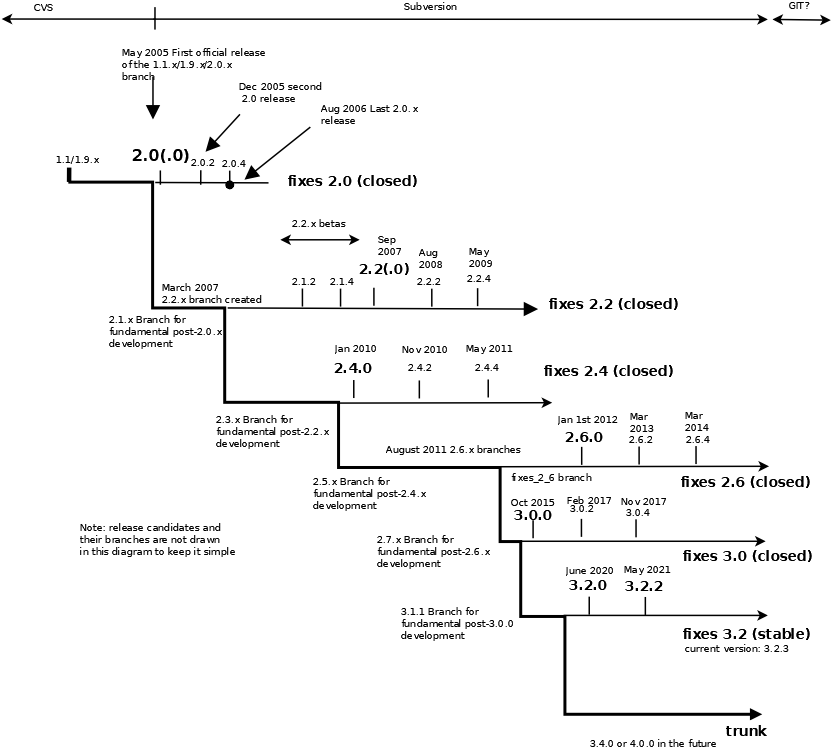
- Eventually the 1.1.x versions, when stabilized, were released as the 2.0.x series, preceded by betas marked as 1.9.x. Fixes to the 2.0 release were numbered 2.0.x, fixes to the 2.2 release 2.2.x, fixes to the 2.4 release as 2.4.x etc.
- The new development version after the 2.4.0 release was numbered 2.5.x and so on.
- Repackagings that affect sources are indicated with a single letter as suffix (e.g. 2.0.4a). This is usually the case for platforms that weren’t part of the original release round.
- The stable branch (currently, fixes_3_0, previously fixes_2_6) always has an odd last number (2.6.1, 2.6.3 and 3.0.1). Compilers with such versions are snapshots, and a snapshot with 2.6.1 can be anywhere between 2.6.0 and the moment 2.6.2 branched off (Jan 2013). Likewise, after the release of 2.6.2 the fixes_2_6 branch identified itself as version 2.6.3 till 2.6.4 branched off (typically two months before its release). After 2.6.4, the stable branch’s number was updated to 2.6.5, after 3.0.2 to 3.0.3 etc.
Normally, you would want to use a release. Releases are considered stable, and easier to support (the bugs, quirks and unintended “features” are well known after a period of time, and workarounds exist).
Development snapshots (which are generated daily) reflect the current status of the compiler. Development versions probably have new features and larger bugs fixed since the last release, but might have some temporary stability drawbacks (which are usually fixed by the next day).
Development snapshots are often quite useful for certain categories of users. Ask on the mailing lists if it is worth the trouble in your case if you are not sure.
Snapshots of the stable branch (fixes_3_2) are meant to test release engineering. They are mainly interesting in the months before a release to extensively test the branch from which the release is created.
We advise all users to upgrade to the newest version for their target (preferably the new stable 3.2.x series).
A graphical timeline of the FPC project plus its near future would be:
4 - Free Pascal and GNU Pascal - a comparison
| Free Pascal (FPC) | GNU Pascal (GPC) | |
|---|---|---|
| Aim | FPC tries to implement a Borland compatible pascal compiler on as many platforms as possible. | GPC tries to implement a portable pascal compiler based on POSIX. |
| Version | Currently, FPC is at version 3.2.2 (May 2021). | GPC is stopped version 2.1 (from 2002, which can be built with several different GCC’s as backend; their Mac OS X version is an exception though, as it follows the GCC version number). |
| Tracking | Between releases, development versions of FPC are available through daily snapshots and the source via SVN. | GPC issues a set of patches to the last version a few times a year, and there are regular snapshot for OS X and Windows, made by users. |
| Operating systems | FPC runs on a large number of platforms, inlcuding DOS (16/32-bit), Win32 (no UNIX porting layer needed), Linux, FreeBSD, NetBSD, OS/2, BeOS, Mac OS X, on the following architectures: x86 (32 and 64 bit), SPARC, PowerPC (32 and 64 bit), ARM, Java Virtual Machine (under development), and MIPS (under development). | GPC runs basically on any system that supported by GCC, and for which the build process was verified. |
| Bootstrapping | FPC requires a suitable set of binutils (AS, AR, LD) on some platforms, GNU make and a command line bootstrap compiler. New architectures/OSes are cross-compiled. | GPC bootstraps via a suitable version of GCC, and requires a full set of binutils, flex, bison, gmake, a POSIX shell and libtool. |
| Sources | FPC is entirely written in Pascal. | GPC is written in C (it’s an adaptation of the GNU C compiler). |
| Language | FPC supports the Borland Pascal dialect, implements the Delphi Object Pascal language, Objective-Pascal and has some support for ISO 7185 Pascal and Mac Pascal extensions. | GPC supports ISO 7185, ISO 10206 and (most of) Borland Pascal 7.0 |
| Extensions | FPC implements method, function and operator overloading (later Delphi versions have also added these, so strictly they are not extensions anymore). | GNU Pascal implements operator overloading. |
| License | Under the GNU GPL | Under the GNU GPL |
| Author | FPC was started by Florian Klämpfl (florian@freepascal.org), Germany | GPC was started by Jukka Virtanen (jtv@hut.fi), Finland |
5 - License and copyright information
Applications created by the compiler and using the runtime library (RTL) come under a modified Library GNU Public License (LGPL). This license does not impose any kind of license on the created applications. It is therefore possible to create closed source or proprietary software using the Free Pascal Compiler.
The following exception has been added to the LGPL variant that applies to the FPC RTL:
As a special exception, the copyright holders of this library give you permission to link this library with independent modules to produce an executable, regardless of the license terms of these independent modules, and to copy and distribute the resulting executable under terms of your choice, provided that you also meet, for each linked independent module, the terms and conditions of the license of that module. An independent module is a module which is not derived from or based on this library. If you modify this library, you may extend this exception to your version of the library, but you not obligated to do so. If you do not wish to do so, delete this exception statement from your version.
Please note that you still have to comply to the LGPL as far as sources of the runtime library itself are concerned. This, for example, requires you to provide the source code of the runtime library if a recipient of your application asks for it. If you want to write proprietary closed source software, please comply with the following terms:
- Most people can satisfy the source code requirement by mentioning that the RTL source code can be downloaded at the Free Pascal web site: if you did not modify the rtl this is considered adequate to satisfy the LGPL requirement of providing source code.
- If you made modifications to the runtime library, you cannot keep them for yourself, you must make them available if requested by recipients of your application.
- Distribute the modified LGPL license with your product, indicating to which parts of your application it applies (the FPC RTL).
The compiler source code, on the other hand, comes under the GNU General Public License, which means that the compiler source can only be used in software projects that are distributed under a compatible license (or that are not distributed at all).
6 - Getting the compiler
The latest official stable Free Pascal release is available for download from all official mirrors
7 - Free Pascal installation hints
8 - Why do I have to supply a user name and password to get Free Pascal?
You are trying to login to an ftp site. You have to use the login name “anonymous” and your e-mail address as your password.
9 - Access denied error when connecting to the Free Pascal FTP site
The Free Pascal main ftp site can only accept a maximum number of simultaneous connections. If this error occurs, it is because this limit has been reached. The solution is either to wait and retry later, or better still use one of the Free Pascal mirror sites.
10 - I want a new version now
In the time between the release of new official versions, you can have a look at and test developer versions (so-called “snapshots”). Be warned though: this is work in progress, so in addition to old bugs fixed and new features added, this may also contain new bugs.
Snapshots are generated automatically each night from the current source at that moment. Sometimes this may fail due to bigger changes not yet fully implemented. If your version does not work, try again one or two days later.
The latest snapshot can always be downloaded from the development web page.
11 - Installing a snapshot
To install a snapshot, extract the zip archive into the existing program directory of the last official version of Free Pascal (after making a backup of the original, of course). You can also extract it into an empty directory and then move the files to the program directory, overwriting existing files.
12 - I have to write a program for homework. Can you help?
No. Please, don’t send us mail about homework, we are no teachers. The Free Pascal development team tries to give good support for the Free Pascal compiler and are trying to always reply to emails. If we get emails like this, this becomes harder and harder.
13 - How do I make a real Windows application with windows and menu bars?
The easiest way is to download Lazarus. It won’t be just a Windows application, it will also work under Linux, FreeBSD and Mac OS X.
14 - How do I make a game with Free Pascal? Can I make a game like Doom 3?
Yes, you can make games with Free Pascal and if you are really good you can make a game like Doom 3. Making games is difficult, you need to be an experienced programmer to make them. The web site www.pascalgamedevelopment.com is a community of people who program games in Free Pascal and Delphi.
If you want a start, please start to study JEDI-SDL or PTCPas. Also you can try to study an existing game, for example The Sheep Killer is a very simple game and it should not be very hard to understand its code.
15 - Getting more information when an application crashes
- The easiest possibility is to recompile your program with
-gldebugging option. This way unitLineInfois automatically linked in, and the printout after a program crash then contains source line numbers in addition to addresses of the crash. To see runtime library (RTL) functions in the backtrace with their real name, you have to recompile the RTL with-gltoo. - For more comprehensive checking, compile the program with debugging information (use the
-gcommand line option) - Load the program in the debugger
gdb --directory=<src dirs> myprog.exe- Under UNIX systems (Linux, the BSD’s), don’t add the “.exe” after
myprog src dirsis a list of directories containing the source code files ofmyprogand the units it uses separated by semi-colons (;) on Windows, or colons (:) on UNIX platforms. The current directory is automatically included.
-
Once inside the debugger, you can (optionally) set the command line options that will be passed to your program using the command
set args <option1 option2 ...> -
To start the program, type
runand press enter -
After the program has crashed, the address of the instruction where the crash occurred will be shown. The debugger will try to display the source code line corresponding with this address. Note that this can be inside a procedure of the RTL, so the source may not always be available and most likely the RTL wasn’t compiled with debugging information.
-
If you then type
bt(BackTrace), the address on the call stack will be shown (the addresses of the procedures which were called before the program got to the current address). You can see which source code lines these present using the command
info line *<address> # e.g., info line *0x05bd8
16 - Compiler seems to skip files in directories -Fu points to
This sometimes happens with installation/compilation scripts if the copying command doesn’t preserve dates. The object files get older than the PPU file, and the compiler tries to recompile them. A simple touch will solve it.
Also note that FPC, contrary to Turbo Pascal keeps track of include files. Modified include files or duplicate names can trigger an attempt to recompile.
17 - Why are the generated binaries so big?
There are several reasons and remedies for this:
- You can create smartlinked applications. To turn on the generation of smartlinkable units, use the
-CXcommand line option when compiling your units. To turn on the linking of previously generated smarlinkable units, use the-XXcommand line option when compiling a program. - Normally, all symbol information is included in the resulting program (for easier debugging). You can remove this by using the
-Xscommand line option when compiling your program (it will not do anything when compiling units) - Turn on optimizations, both for supplied packages (RTL, FV, FCL) and for your own code, this will also decrease the code size.
Generally Free Pascal generates smaller binaries than modern competing compilers, however, it does not hide code in large dynamic libraries. Free Pascal generates larger binaries than compilers from long ago do. Large framework libraries result in larger executables.
See also the Size Matters wiki entry.
18 - Runtime errors
When an application generated by FPC terminates in an abnormal way, it is very likely that a runtime error will be generated. These errors have the form:
  Runtime error 201 at $00010F86
    $00010F86  main,  line 7 of testr.pas
    $0000206D
The 201 in this case indicates the runtime error number. The definition of the different runtime error numbers is described in the Free Pascal user’s manual Appendix D. The
hexadecimal numbers represent the addresses on the call stack when the error occurred.
19 - Standard units
To see the list of base units supplied with Free Pascal, and on which platform they are supported, consult the Free Pascal user’s manual. There is also a short description of what each unit does in the same section of the manual.
20 - Debugging smart-linked code does not fully work
Debugging smart-linked code might not work correctly. This is due to the fact that no type information is emitted for smart-linked code. If this would not be done, the files would become enormous.
While debugging, it is not recommended to use the smart-linking option.
21 - Cannot compile a program using a binary-only version of a unit
Sometimes, even though there is a binary version of a module (unit file and object file) available, the compiler claims it cannot find the unit This can be caused either by an incompatibility in the PPU file format (which can change across compiler versions), or by a change in one of the units of the RTL that has changed in between releases.
To get more information, compile the code using the -vtu (show tried and used unit information) compiler switch, and the unit loading phase will be displayed. You might discover that the unit being loaded requires to be recompiled because one of the unit it uses has changed.
If you plan on distributing a module without the source code, the binaries should be compiled and made available for all versions of the compiler you wish to support, otherwise compilation errors are bound to occur.
22 - Will you support ISO Extended Pascal?
FPC’s primary goal is to be a Turbo Pascal and Delphi-compatible compiler, and it also supports a subset of the Mac-Pascal dialect and of Standard ISO Pascal. While in theory it would be possible to add a complete ISO Standard or Extended Pascal modes, until now no people interested in such functionality have stepped up to work on such features.
GNU-Pascal is however a modern compiler that can compile ISO Extended Pascal. If you have any need for the ISO Extended Pascal dialect, we recommend you to take a look at this compiler.
23 - What about .NET?
Occasionally, users ask about a FPC that supports .NET, or our plans in that direction.
Mainly the users are either interested because of .NET’s portability aspects (Mono is quoted over and over again), or because it is supposed to be the next big thing in Windows programming, and they think Windows programming will not be possible in the future.
While the FPC core developers are somewhat interested out of academic curiosity (mainly because it could be a pilot for a generalized backend creating bytecode) there are however several problems with .NET in combination with FPC:
- Pascal is a language that uses pointers, and existing codebases can only be unmanaged. Unmanaged code is not portable under .NET, so that already kills most possible benefits. This also means that existing FPC and Delphi code won’t run on .NET. There are more such little language problems.
- FPC’s libraries are not based on .NET classes and data models (and cannot be changed to do so without effectively rewriting them), moreover the libraries could only be unmanaged too, or they would be incompatible.
- There is nothing practical known yet about how portable an average .NET program will be. Little experiments with “hello world” level code mean nothing, that kind of code works with nearly any language. A good test would be to see existing non trivial codebases run unmodified under mono, that were not designed with mono in mind. Just like we try to do for Delphi.
- The fact that on Windows 80% of the .NET code seems to be ASP.NET does not help either. This makes porting existing code less useful (since ASP.NET is tied to IIS), and new codebases of portable code can be set in nearly every language.
- Operating System dependant code would not work anymore, since the Win32/64 interface is unmanaged.
So effectively this means that for FPC to benefit from .NET you would have to significantly adapt the language (thus compiler) and libraries, and be incompatible with the existing native sourcecode. Moreover that also means that existing apps would have to be rewritten for .NET, since it would take more than a simple recompile with a FPC/.NET compiler.
While unmanaged code has some uses (easier integration with managed code inside Windows), this still requires writing a code generator and defining interfaces and libraries. This means a lot of work and since .NET take-up is not really high, this might not be worth it.
However if a FPC user does the bulk of the work (e.g. a bytecode code generator, and maybe some base libraries) and if the work is suitable for inclusion in FPC (a very big if), we will of course include it.
Since support for generating JVM bytecode has been added to the compiler, such a project may be more realistic now than it has been in the past. Many of the caveats mentioned above still hold though: language compatibility is not 100% and most standard units will have to be reimplemented.